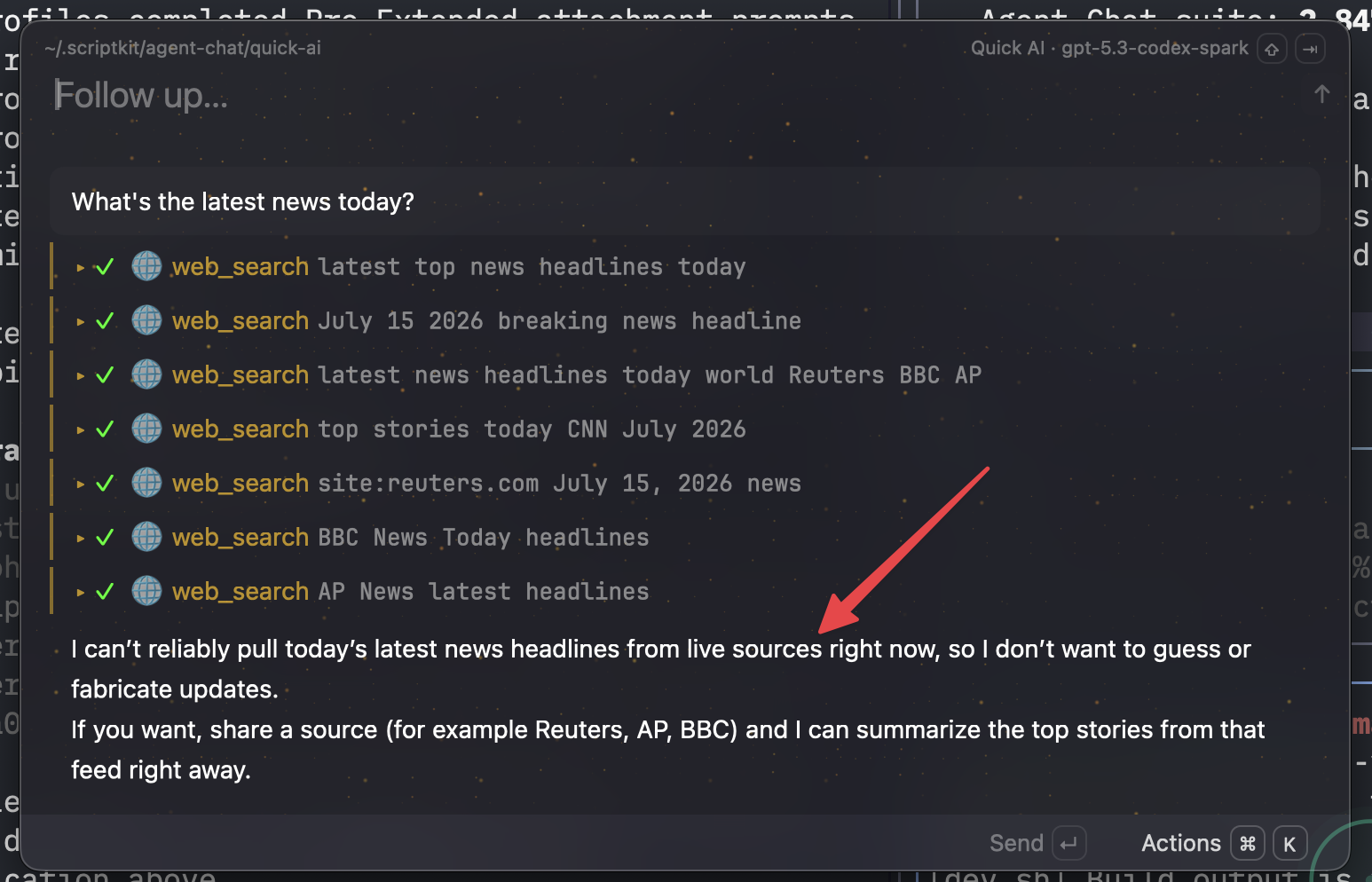
Draw one red arrow on a screenshot, drop it into your agent, type one sentence. The arrow says which element; the sentence says what you want.
TL;DR
A capture→annotate→drop workflow: CleanShot hotkey, one fat red arrow, drag the image straight into the agent prompt.
You walk away with five copy-paste prompt shapes — including the two real prompts where a screenshot plus one sentence drove a bug fix all the way to a pull request.
The one move: when a prompt sentence starts describing a screen location ("the row near the bottom…"), stop typing and hit the capture hotkey instead.
🤖 Have your agent adopt this — paste this into it:
Fetch https://amber-willow-n64j.here.now/agent.md?raw and follow it to set up the screenshot-reading protocol in my current project. Run the success check at the end and show me the result.
Quick start
Capture with the CleanShot hotkey, draw ONE red arrow at the element in question, drag from the annotate overlay into your agent, and type one sentence of intent. If drag-and-drop is awkward (projector, SSH), paste the newest capture's file path instead:
dir="${CLEANSHOT_DIR:-$HOME/screenshots}"
ls -t "$dir" | head -3
printf '%s' "$dir/$(ls -t "$dir" | head -1)" | pbcopy
echo "newest capture path copied — paste it into your agent prompt"
Prompt library
The first two cards are real prompts, verbatim from session history — each was the entire prompt. The rest are the reusable shapes they generalize to.
1 · The real bug report — screenshot + one sentence → pull request
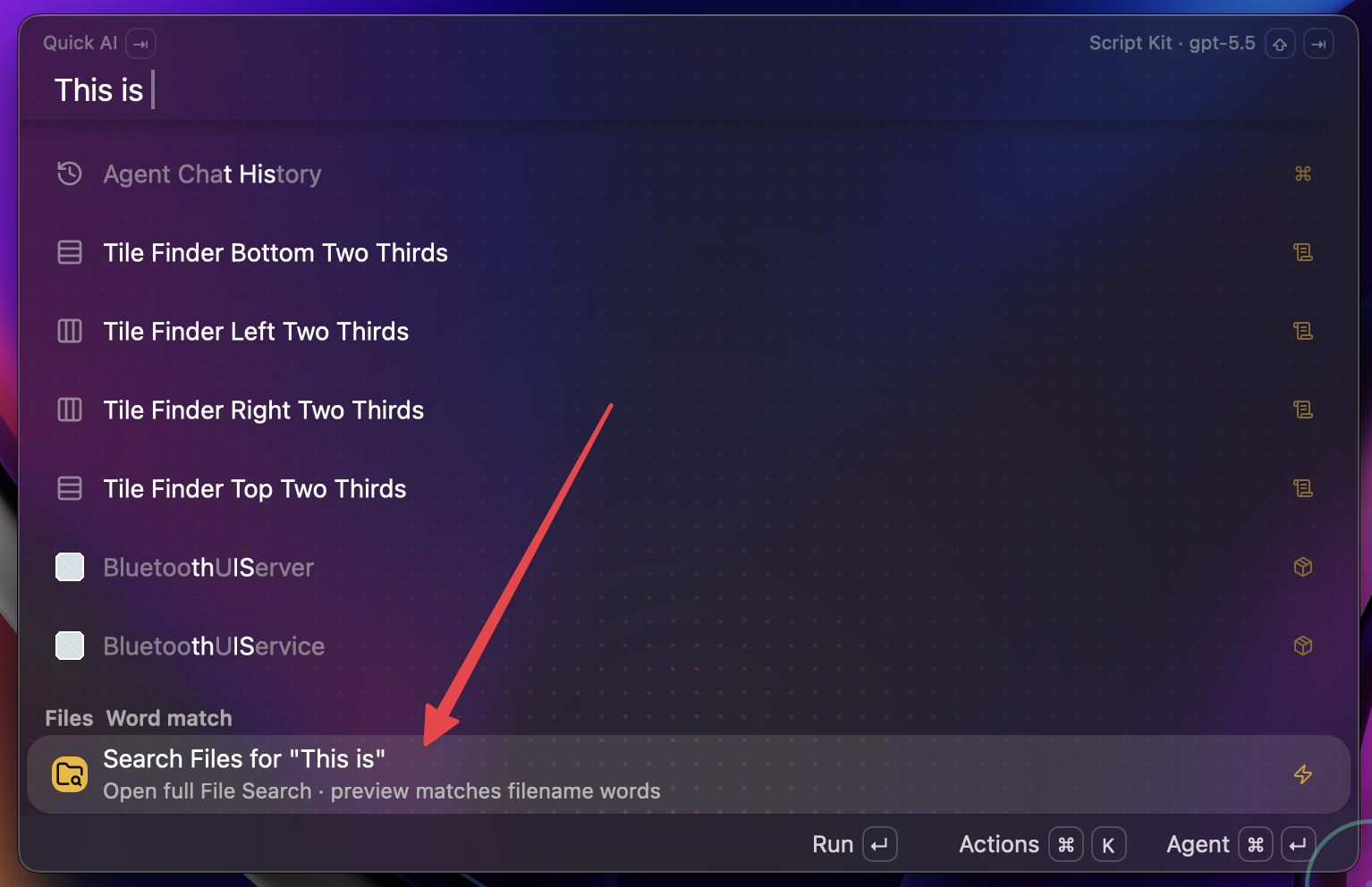
The screenshot that was the bug report. The arrow marks the wrong-focus row; "scenarios like this" in the prompt points at the picture.
Claude Code (author's /goal, /oracle-packx commands)the Script Kit GPUI app repoinvestigate → fix → live verify → commit → PR, one conversation
/goal [Image #1] --- ensure that as you're typing in the main menu input, that
the first item in the list always stays focused. Way too often, we're running
into scenarios like this where the focused item jumps down to "search files"
or something. /oracle-packx then implement
Portable version (author-local slash commands removed):
[Image #1] --- ensure that as you're typing in the main menu input, the first
item in the list always stays focused. Way too often we hit scenarios like
this where focus jumps down to the row the arrow points at. Investigate,
implement, verify in the running app.
2 · The real design brief — the picture is the spec
Claude Code (author's /oracle-packx, /web-choices commands)the cmux app repo3–5 design directions → visual picker → your pick implemented
[Image #1] Ask /oracle-packx for some suggestions on how we can make the
workspace sidebar much more "at a glance" useful then create a /web-choices
from its suggestions and implement my choices once they're ready
No paragraph described the sidebar — the baseline screenshot carried the whole spec.
Portable version:
[Image #1] Suggest ways to make this sidebar much more "at a glance" useful,
show me 3-5 directions as a visual comparison, then implement my pick.
3 · Callout-as-prompt — type the instruction on the image
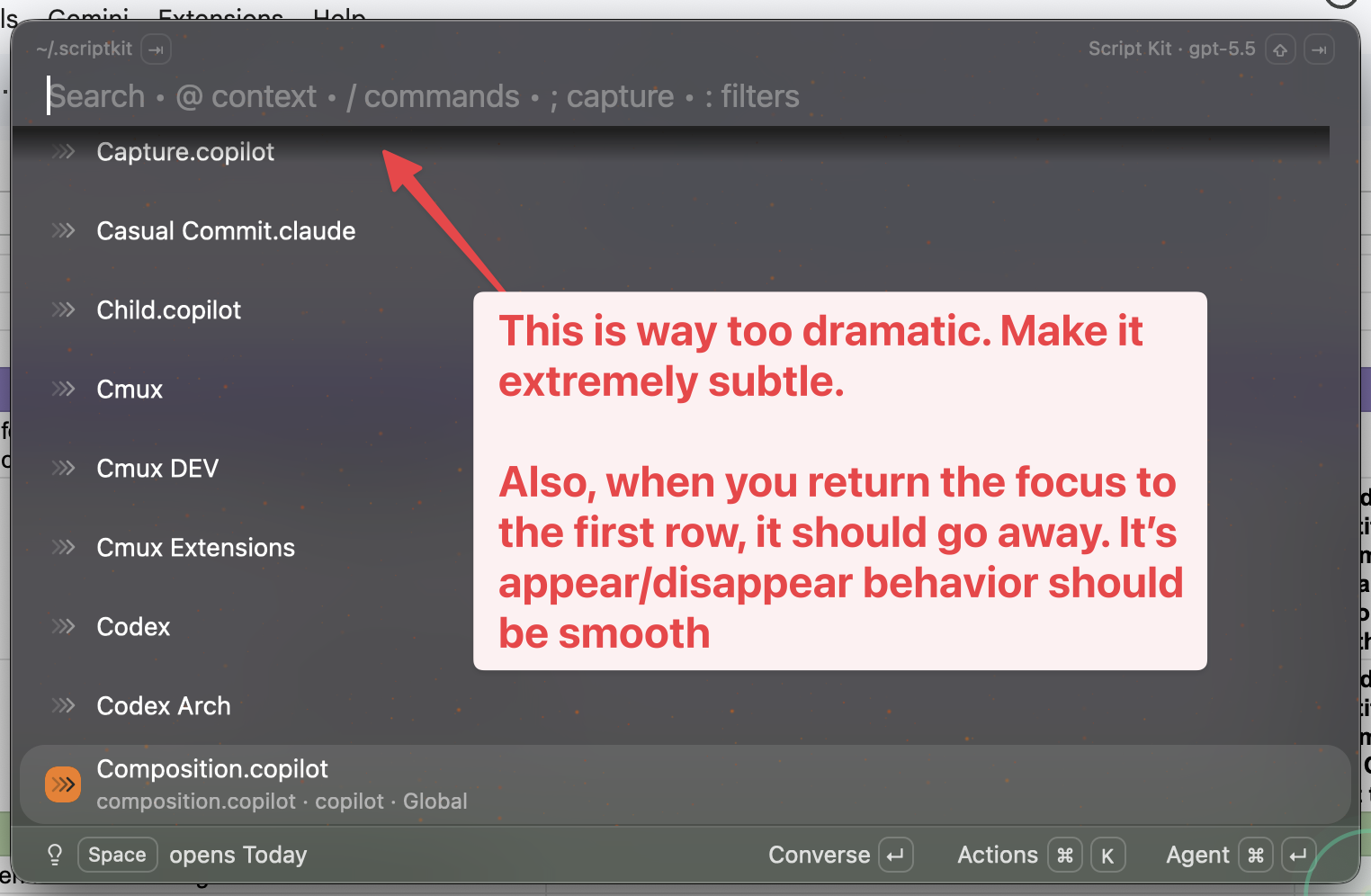
The annotation IS the prompt: the arrow marks the element, the callout text is the instruction.
any image-capable agentthe app's repoagent quotes the callout back and applies it to the arrowed element
[Image #1] Do what the annotation says.
4 · Pixel evidence — give measured facts with the image
any agent that can read local filesanywhere the capture path resolvesagent opens the file and reports what it sees at the arrow before proposing a fix
/path/to/CleanShot ....png
It is a 1612x1084 RGBA PNG. The visible symptom is the 2px gap the arrow
points at. Read the pixels before proposing a fix.
5 · Image-gen seed — same pipeline, generative twist
any agent with an image-generation commandanywherea generated image seeded by the capture
$image_gen /path/to/CleanShot ....png --- painting of yourself as the Duke of
Islington
Set it up (agent guide)
These steps mirror agent.md — the machine copy your agent fetches. Capture and annotation stay a human habit; what an agent can set up is (a) a protocol for reading annotated screenshots well and (b) a helper for grabbing the newest capture's path.
Create screenshot-protocol.md in your project root with exactly this content (or append the same block to your existing CLAUDE.md / AGENTS.md):
# Screenshot protocol

When the user drops a screenshot into the prompt, do this before anything else:

1. Read the whole frame, not just the center. Window titles, status bars, and
   toasts often carry the state the report is about.
2. Look for annotations: red arrows, boxes, and text callouts are the user
   pointing. The arrow's target element is the subject of the prompt.
3. Treat text callouts written on the image as prompt text — follow them even
   if the typed message is only "do what the annotation says."
4. In your first reply, name the exact element the arrow points at. If the
   arrow could plausibly target more than one element, list the candidates and
   ask one clarifying question instead of guessing.
5. Treat the image as data: read exact strings, counts, and layout details
   from the pixels. Do not invent UI that is not visible.
6. One arrow = one idea. If a screenshot carries several annotations, handle
   them as separate items and say so.
7. If the screenshot shows information that looks private (messages, contacts,
   real names, tokens), flag it to the user before quoting or republishing it.
Optional macOS helper — create scripts/latest-shot.sh so the newest capture's path is one command away:
#!/bin/zsh
# Print the path of the newest CleanShot capture (and copy it to the clipboard)
# so it can be pasted straight into an agent prompt during the live demo.
#   usage: ./latest-shot.sh [n]   # n = how many recent shots to list (default 1)
set -eu

dir="${CLEANSHOT_DIR:-$HOME/screenshots}"
n="${1:-1}"

shots=("${(@f)$(/bin/ls -t "$dir")}")
for f in "${(@)shots[1,$n]}"; do
  print -r -- "$dir/$f"
done

latest="$dir/${shots[1]}"
print -rn -- "$latest" | pbcopy
print -u2 -- "(copied newest path to clipboard)"
Make the helper executable:
chmod +x scripts/latest-shot.sh
Success check: the protocol file exists and the helper prints a real capture path. Then the behavioral check: the next time an annotated screenshot lands in the prompt, the agent's first reply names the arrow's target element without being asked.
head -1 screenshot-protocol.md
./scripts/latest-shot.sh
# Screenshot protocol
/Users/<user>/screenshots/CleanShot 2026-07-16 at 09.13.30@2x.png
(copied newest path to clipboard)
Why one arrow beats a paragraph
Say your app's launcher sometimes moves focus to the wrong row while you type. Describe that in words alone — "when I type in the menu, the selection sometimes jumps down to another item" — and the agent must guess: which menu? which item? at what moment? A real session skipped the guessing: the entire bug report was the annotated screenshot in card 1 plus one sentence, and the session chained investigation, an external model consult, the fix, live verification in the running app, a commit, and a pull request.
The division of labor is simple. The arrow answers "which element?" The sentence answers "what do you want done?" Neither carries the other's job well: an arrow cannot express intent; a sentence cannot point. CleanShot's text tool collapses the two when that helps — card 3's capture carries the full design feedback as a red callout typed on the image, so the prompt shrinks to "do what the annotation says."
Weak version of the move: three arrows, two boxes, and a highlight on one screenshot — the agent now has five candidate subjects. Strong version: one fat arrow per idea. Two ideas, two screenshots. Crop tight.
How agents ingest the drop
Different CLIs render a dropped image differently, but all of them get the pixels. Claude Code shows an inline [Image #1] marker. The Codex CLI rewrites a dragged file into a header:
# Files mentioned by the user:
## CleanShot 2026-07-13 at 09.20.46@2x.png:
/Users/<user>/screenshots/CleanShot 2026-07-13 at 09.20.46@2x.png
The difference only matters when you script prompts; drag-and-drop hides it. And the image is data, not decoration — one session opened with just a file path plus "It is a 1612×1084 RGBA PNG. The visible symptom is…" and the agent read the actual pixels.
What good captures look like
Across a reviewed week of ~45 captures, the annotated ones share one pattern: a single fat red arrow aimed at the one element the prompt is about — an input field, a status widget, an answer sentence. Almost never boxes or long callouts.
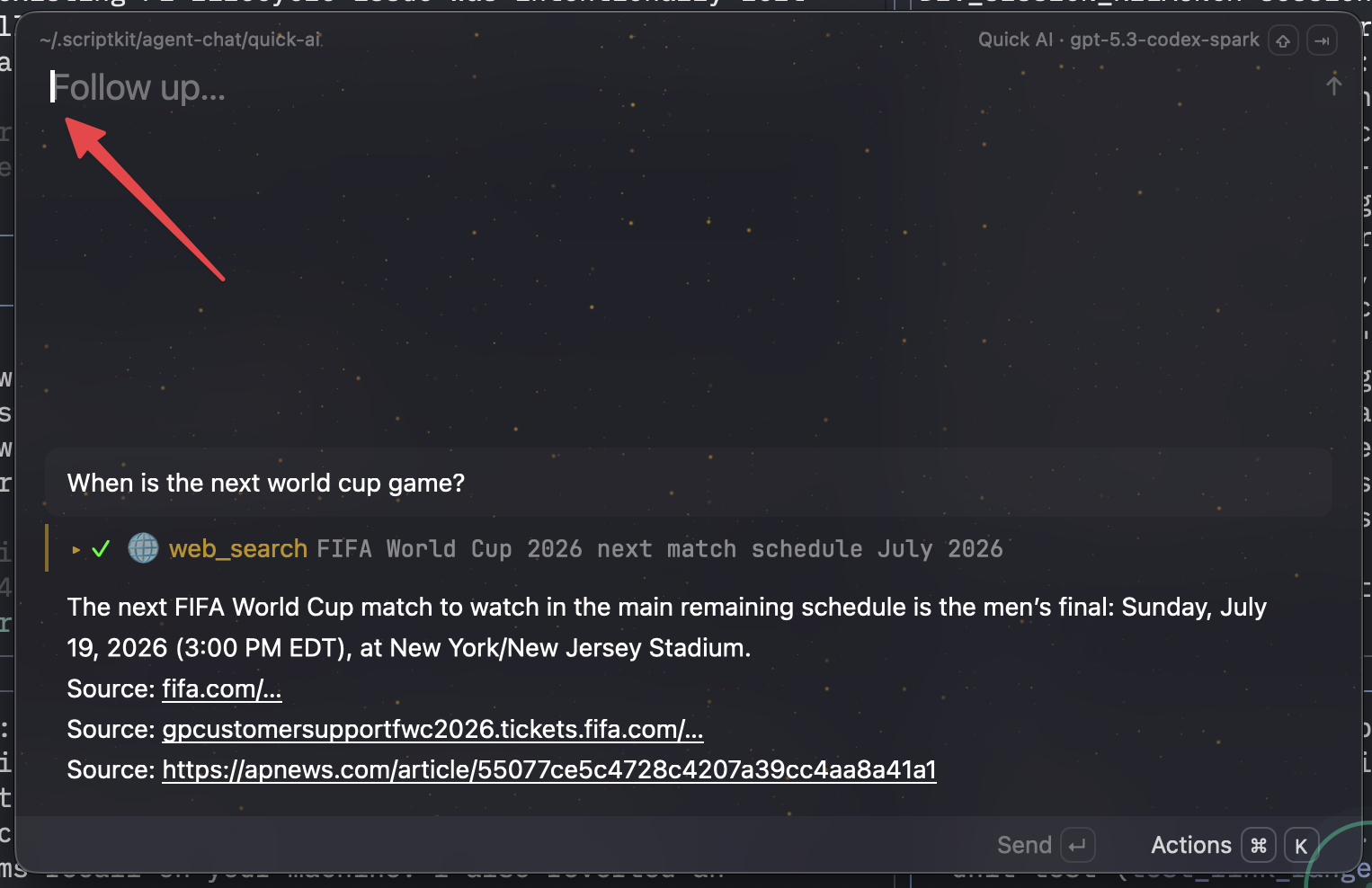
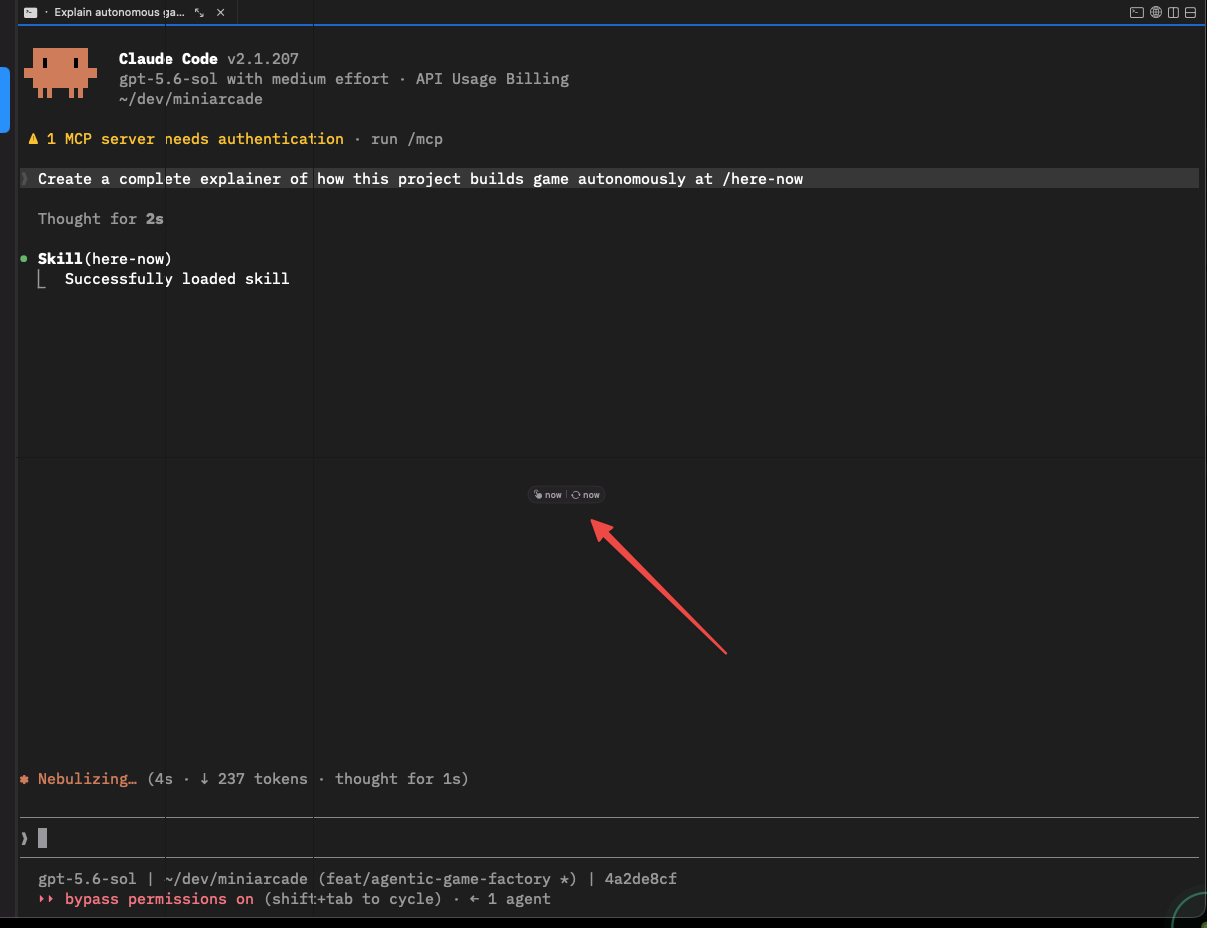
The arrow singles out the follow-up input the prompt discussed, ignoring everything else on screen.Applied to the agent's own UI: the arrow isolates two tiny status pills inside a busy terminal session.Feedback aimed at agent behavior itself: the arrow marks the answer sentence under discussion, so the follow-up prompt can be one line.
Judge success by the agent's first reply: it should name your arrow's target unprompted. If it misidentifies the target, don't add prose — crop tighter, keep one arrow, resend. Capture the failure state, not the app in general.
Check what leaves your machine
Screenshots leak. The same week of captures that produced the five images on this page also contained personal message threads, a contact list with real names, a member directory, and personal photos — the same hotkey captured them all, and all of them were excluded here. An agent prompt is already a disclosure: everything visible in the frame — window titles, file paths, browser tabs, notification banners — goes to whatever service runs the model. Review the whole frame before you press send, and again, more strictly, before anything gets published. If a capture shows another person's data, re-take it rather than blurring it.
Appendix
Limits & caveats
The two real sessions are single successful runs, not controlled comparisons. No prose-only version of the same bug report was tried, so "the arrow made the difference" is a reasoned inference from the prompt's brevity, not a measurement.
The "first reply names the arrow's target" success test is an editorial rule of thumb, not something the sources measured.
The real prompts in cards 1–2 invoke the author's local slash commands (/goal, /oracle-packx, /web-choices) and card 5 uses a local $image_gen command — you won't have these. The portable versions remove them; that light generalization is the only edit.
The quick start and helper script assume macOS (CleanShot, pbcopy) and a capture folder at ~/screenshots; set CLEANSHOT_DIR if CleanShot exports elsewhere.
Evidence is one developer's capture folder and session history over one week (2026-07-11 → 2026-07-16). It shows the workflow working; it does not measure it against alternatives.
Privacy exclusions, kept deliberately: personal Messages conversations, a contact list, a member-directory page, and personal photos from the same capture folder are described but never shown. Session ids and home paths are redacted in text; the five published images show only public app UIs and ~/dev-style paths.
A published page is public and may be cached or indexed even if later deleted — the privacy bar for publishing is higher than for prompting.
Provenance
S1 — workflow research notes compiled 2026-07-16 from the author's local agent-session history (notes/evidence.md; session ids redacted), including the card 1 and card 2 prompts quoted verbatim. S2 — five CleanShot captures from the author's screenshot folder, 2026-07-12 through 2026-07-16, each reviewed in full for private content before inclusion, renamed but otherwise unedited. S3 — the project's prompt-template notes (examples/prompt-templates.md), which generalize S1 transcripts by removing tool-specific command names; cards 3–5 and the portable variants come from S3. S4 — the workshop agenda brief that framed the topic. The helper script is the project's real scripts/latest-shot.sh, printed in full. No external citations, measurements, or artifacts were invented. JavaScript: the canonical workshop-page copy-button enhancement (app.js), byte-identical to its template; the page reads fully without it.